Showing posts with label Operating System (Softwares). Show all posts
Showing posts with label Operating System (Softwares). Show all posts
Tuesday, April 24, 2012
It is no longer an effective way to get your website indexed by search engine
submission. It would be better if you could get a link from a friendly website that
shares the same topic.
However, for most newbie webmasters, it is not easy to get more backlinks quickly.
Since your website is new and has not been indexed, most webmasters will not want
to link to your website!
submission. It would be better if you could get a link from a friendly website that
shares the same topic.
However, for most newbie webmasters, it is not easy to get more backlinks quickly.
Since your website is new and has not been indexed, most webmasters will not want
to link to your website!
So I Just Brought Something Very Helpful For Your Site or Blog And Will Help You To generate traffic and Backlinks For Free ..
Submit Your Website in my new Site http://www.mywebsitehere.blogspot.com
For Fast listning Use This Code In the End Of Your Site's Description -- IamMitul
So If You Write IamMitul Code In description I will submit your site instantly there ..
You Can Also Tell You Friends about the code .
This Code Is Valid Upto 15 May
So Dont Wait Submit your site/blog now !
Thanks !
Tuesday, April 24, 2012 2
Saturday, March 31, 2012

Windows 8 Transformation Pack 4.0
OS : Windows 7, Vista, XP | Year : 2012 | 56.8 MB
Windows 8 Transformation Pack - a worthy successor to the well-known and the Seven Transformation Pack Vista Transformation Pack ... Only now you have the opportunity to transform their XP/Vista/7 nemaloizvestnuyu in Windows 8. Windows 8 Boot Screen, Login Screen, themes, wallpapers, icons, sounds, Metro UI (Newgen), Aero's Auto-Colorization, the task bar UserTile and more will create the impression that you have installed Windows 8.
Features
Seamless installation and uninstallation giving users safe transformation
Easily configurable in single click with intelligence Metro UI design
Designed for all editions of Windows XP/Vista/7 including Server Editions
Genuine Windows 8 system resources with Metro touches
Smart system files updating with auto-repair and Windows Update friendly
Fresh start for Vista/Seven Transformation Pack users with updated Windows 8 themes and resources
UxStyle memory patching
Windows 8 themes, wallpaper and logon screen
UserTile with current user auto-configured on login
Metro UI desktop emulation with pre-configured gadgets
Aero's auto-colorization feature
And much more
What's New in This Release:
Added Charms Bar as alternatives for those who can't get full Immersive UI to work
Added new Segoe family fonts from Windows 8 Consumer Preview with Windows Vista/7 font update support
Improved system files modification framework (More secure and safe to handle)
Fixed disabling system files modification that won't work on installation
Fixed explorer not restoring after choosing to cancel restart during configuration
Fixed permission problems in some programs that perform changes in Program Files
Fixed system files modification bug in Program Files on x64 platform
Fixed unchecking large icon doesn't restore icon size bug
Fixed uninstallation script that removes legacy theme registry
Updated component UI font to Tahoma and info font to Segoe UI
Updated default Metro Desktop UI option to Immersive UI with Charms Bar as default option
Updated default pictures of guest and user to Windows 8 Consumer Preview ones
Updated Metro Inspirat Windows XP visual style to version 3.0
Updated Newgen to version 8.0
Updated Newgen UI to match with Windows 8 Consumer Preview
Updated system files resources
|-logon screen
|-shell branding and logo
|-shell icons
|-start button/orb
|-system tray icons
Updated TrueTransparency skin based on Windows 8 Consumer Preview default color
Updated wallpapers to Windows 8 Consumer Preview ones
Unchecked 'Aero's auto-colorization (Vista/7) only' feature to get Windows 8's default colorization
Download:
http://extabit.com/file/28dhpzbrcacfu/W8TPack.4.0.rar
http://letitbit.net/download/71944.741ccac7f75eb86f87ddae8a84bf/W8TPack.4.0.rar.html
Saturday, March 31, 2012 0
Friday, March 9, 2012

Windows 8 Skin Pack 12.0 for Windows 7 x86/x64 | 35MB
8 Skin Pack includes the assembly of the various programs and system components that can quickly transform the "appearance" Windows 7. As a result of the update your system's interface takes the form, practically no different from Windows 8 Consumer Preview.
Topic is fully in automatic install on your PC after you start your respective system (x86 or x64) installer. Once finished with the installation and restart Windows, you can immediately see the updated design of the system.
In order to run some programs are required to run the latest versions. NET Framework and Visual C + + Runtime
Before installing the package, you must disable the User Account Control, and close all running programs. After installation, you must restart the system.
For quick and correct installation of 8 Skin Pack must be removed (if they have been previously installed), or other other versions of packages to customize the interface (Skin Packs).
Supported OS:
- X86 (32Bit) - Windows 7, Windows 7 SP1
- For x64 (64Bit) - Windows 7, Windows 7 SP1
- Support for all system languages
Programs used in the topic:
- Resource Hacker 3.6 by angus johnson
- Moveex 1.0 by Alexander Frink
- Universal Theme Patcher 1.5.0.22 by deepxw
- Win7BootUpdater v0 Beta 1 by jeff
- Newgen 8.0 by raymonvisual based on mosaic new widget by usteg
- BetterExplorer 2.0.0.731 Alpha by DimitarCC
- Taskbar UserTile alpha 7.1 By angelwzr
- Aura Beta 3 By Stealth2010
- Metro Clock Lock ScreenSaver 3.0 by dejco
- Windows 8 VS beta3 for Win7 by fediaFedia
- Windows 8 VS "v1.2" with aerolite gui by Misaki2009
- Metro glass Theme By jaycee13
- Metro White Theme By pisadeviant
- Aero Lite Basic Theme By thepanda_x
- Aero Lite Glass Theme By shelkadom
- Aero Lite Full Glass Theme By velix94 Refresh by hameddanger
- Metro bar by dejco
- Boot animation by ngconghuan refresh by hameddanger
- Simple 8 by yethzart
- Login Screen by peterrollar
On file:
Enabling | reg code: not required
Language: ML ( Multi Language)
File format: rar
Platform / OS: Windows 7

Friday, March 9, 2012 0
Thursday, February 23, 2012
Windows 8 has been already released with the developer preview edition for the public which can be downloaded and installed by anyone who wish to try out the the most anticipated operating system from Microsoft. Millions of users have already downloaded the preview edition.
If you wish to try out you can also
Download Windows 8 Developer Preview Edition.
It has been known to almost all of the Windows fans that the new Windows 8 will have a new start screen based on live tiles except the traditional icons based desktop for application shortcuts. The Windows 8 start screen shows a live tiles of all application that are built in Windows 8 and shortcuts that you may set by yourself. Now you can Download Windows 8 Start Screen for any Windows version.

We have already shared few Transformation Packs and Skin Packs of Windows 8 for the users who are using Windows 7 , Vista and Windows XP and wish to try out the look and feel of the upcoming Windows version.
We recently discovered another creation from a deviantart artist who created an awesome app to bring ‘Start Screen’ of Windows 8 to your desktop of Windows 7, Vista and XP. It mimics the Start Screen with the exact screen scrolling effect. You can drag/scroll the screen to left or right by dragging the tiles.
This is the closest resemblance of Windows 8 Start Screen we’ve found so far.
You get the following with this pack:

- Socialite Tile for Facebook
- Tweet@rama for Twitter
- News Tile
- Weather Tile
- Picstream Flickr Tile
- Gmail Tile
- Other tiles include paintplay, inkpad, Piano, NearMe, Browser tile, Notespace Tile, Various Shortcut tiles which can be configured
- Mopod Tile to play music, Angry Birds Game, Fruit Ninja Game and limitless.
This application can be installed on Windows 7, Vista and XP (both 32 and 64-bit version).
Download Windows 8 Start Screen
(filesize: 11.5MB)
Must Share It Guyzz...!!
Thursday, February 23, 2012 0
Thursday, February 9, 2012
all are iso images... :)
UBUNTU 11.10
UBUNTU 11.04
- ubuntu 10.10
- Xubuntu 10.10
- Lubuntu 10.10
- Edubuntu 10.10
- Mythbuntu 10.10
- ubuntu-10.10-netbook-remix-i386.iso
- ubuntu-10.10-server-i386.iso
- ubuntu-rescue-remix-10-10.iso
- Blackbuntu
- ubuntu-mini-remix-10.04.1-i386.iso
- ubuntu-10.04-desktop-i386.iso
- kubuntu-10.04-desktop-i386.iso
- Lubuntu-10.04
- Linuxmint-10-gnome
- Linuxmint-10-kde
- Linuxmint-10-lxde
- Linuxmint-debian-gnome-dvd-i386
- Linuxmint-9-gnome-cd-i386.iso
- Linuxmint-9-kde-dvd-i386.iso
- Linuxmint-9-xfce
- Backtrack3 final
- Backtrack 4 Final
- Backtrack-4R2
- Puppy-4.3.1
- Puppy-arcade-10.iso
- LighthousePup-5.02-G.iso
- Fedora-14-i686-Live.iso
- Acronis
- Android-x86.iso
- CentOS-5.5-x86_64-LiveCD.iso
- Clonezilla
- Crunchbang-9.04.01.i386.iso
- DBAN 2.2.6
- Gentoo 10.1
- Fedora-14.0.iso
- Finnix
- Ophcrack-xp-livecd-2.3.1.iso
- Panda Safe CD.iso
- Linux-xp-like
- Tiny Core linux
- ultimate boot cd
- Runt linux 5.0
- slax
- kaspersky-rescuedisk
- AVIRA-rescue_disk
- Debian-live-6.0.0-i386-gnome-desktop.iso
- Ylmf-OS (looks like windows)
- FreeDOS
- Parted-magic (partition tools)
- redo-backup&recovery-livecd
- Ubuntu 11.04 beta(2)
- ArchLinux
- Backtrack-Linux
- CentOS
- CloneZilla
- DamnSmallLinux
- Debian
- Dreamlinux
- Dr Web Antivirus
- Elive
- Fedora
- FreeBSD
- FreeDOS
- FreeNAS
- Frugalware
- Gentoo
- gNewSense
- Gujin
- Kubuntu
- LinuxConsole
- Linux Mint
- Mandriva
- MEPIS
- NetBSD
- openSUSE
- Ophcrack
- PCLinuxOS
- Puppy Linux
- Sabayon Linux
- Slax
- SliTaz
- SuperGrubDisk
- Super OS
- Ubuntu (and official derivatives)
- xPUD
Thursday, February 9, 2012 0
Wednesday, February 8, 2012

Windows 8 is under process, But you can check its new look by Windows 8 Transformation kit. Windows 8 Transformation Pack will provides lots of new features along with a newly designed interface. I am waiting for for Windows 8 but it looks very similar to the windows 7, but there are many new changes like the new boot screen, explorer, taskbar, login screen, Windows 8 Aero Theme and so on.
Check out the screenshot below:
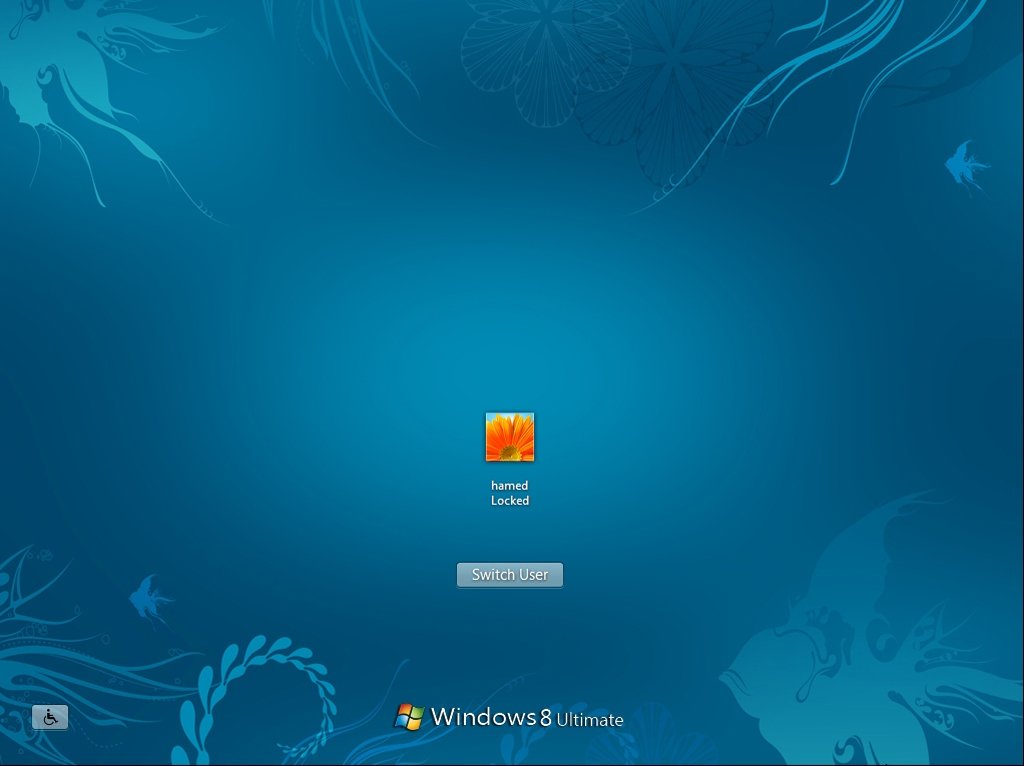


Download: Windows 8 Transformation pack for Windows 7 here
Wednesday, February 8, 2012 0
Tuesday, February 7, 2012
Hii Friends, If you want to try the new Windows 8
Experience like Windows 8 Login Screen, Themes, Wallpapers, Metro UI,
Aero’s Auto-Colorization, Taskbar UserTile and much more on your
Windows 7 PC, try this tool Windows 8 UX Pack. It’s a freeware app
which allows you to try the experience of Windows 8 on Windows 7 PC.

Windows 8 UXP is compatible with both Windows 7 x86 and x64. To use this app you have to uninstall any previous Windows 8 packs if you already using them. Its simple to use and you can also uninstall easily from Control panel.
Download the Windows 8 UX Pack from here
Download windows 8:
Windows Developer Preview with developer tools English, 64-bit (x64)
Windows Developer Preview English, 64-bit (x64)
Windows Developer Preview English, 32-bit (x86)

Windows 8 UXP is compatible with both Windows 7 x86 and x64. To use this app you have to uninstall any previous Windows 8 packs if you already using them. Its simple to use and you can also uninstall easily from Control panel.
Download the Windows 8 UX Pack from here
Download windows 8:
Windows Developer Preview with developer tools English, 64-bit (x64)
Windows Developer Preview English, 64-bit (x64)
Windows Developer Preview English, 32-bit (x86)
Tuesday, February 7, 2012 0
Saturday, January 14, 2012
Follow the steps:
1.Download Windows Vista Full Activation Click Here
2.Open file "Full_Activation_Vista.exe" and wait for a while....Enjoy...............
If You Enjoyed must Share it With Your Friends.. Be
the First of Your Friends
Saturday, January 14, 2012 0
Wednesday, December 28, 2011
Windows 8 Developer Preview Now Available for Download
 Can’t wait to try out Windows 8 for yourself after Microsoft’s big unveiling of the new OS at Tuesday’s Build Conference? Well, you needn’t wait any longer as the developer preview version of the OS is now available for download.
You can install it on a x86-based 32-bit or a 64-bit machine. Activation is not required, but it’s far from a finalized version of the OS, so if you do install it, expect bugs and glitches. In any case, you should definitely check out Microsoft’sWindows 8 guide to get an idea of what you can expect from the next version of Windows.
The download is available here. If you choose to install it, please share your experiences in the comments.
(Just Wait for 5 seconds and After that Click on Skip Ad)
Wednesday, December 28, 2011 0
Download Windows 8 Build 7989 x64-iND

Windows 8 Build 7989 x64-iND
For those of you who are into Windows 8, here is newest leaked build 7989 in 64bit version. According to various sources this build features: New alternate UI (shown in screenshot below), new boot logo/animation, new wallpaper and some other minor tweaks.Make sure to use download links provided below, or if you’re using some of the links from comments – compare MD5/SHA1 hashes to those mentioned in NFO, that way you’ll know you got the real deal.Windows 8 is the codename for an upcoming version of Microsoft Windows, a series of operating systems produced by Microsoft for use on personal computers, including home and business desktops, laptops, netbooks, tablet PCs, and media center PCs. The Start menu is replaced by the new “Start screen”, which includes live application tiles.
The user can return to the regular desktop by choosing a “Desktop” application. Examples of applications on the Start screen include a weather application, Windows Store, Investments, RSS news feeds, user’s Personal Page, and user’s Windows Live Account. The new interface is primarily designed for 16:9 screen resolution, with 1366×768 and larger screens able to display two Windows 8 applications using “Snap”. 1024×768 screens can display one Windows 8 application in full-screen, and 1024×600 screens can only use the traditional Windows Desktop. It has been confirmed by Microsoft that PCs with mice and keyboards can also use Windows 8.
Microsoft also announced that Windows 8 will use the processor and the physical memory more efficiently, to make Windows run more smoothly. Mike Delman, Microsoft’s vice president of global marketing, hinted in an interview that Windows 8 would have Xbox Live integration, similar to Windows Phone 7.

Home Page:
http://www.google.com/search?&q=http://en.wikipedia.org/wiki/Windows_8
Info:
-----------------------------------------
6.2.7989.0.amd64fre.winmain.110421-1825
ISO Size: 3.54 GB (3,811,213,312 bytes)
ISO MD5: 4480F94C0E11CE58DC9B7330678F07DD
SHA1:
C09CDCEC2540D93EEBE650B521B2F7AE477A300A
CRC32: 374EC90D
Installation:
-----------------------------------------
1. Burn/mount/install.
2. Enjoy!
-----------------------------------------
6.2.7989.0.amd64fre.winmain.110421-1825
ISO Size: 3.54 GB (3,811,213,312 bytes)
ISO MD5: 4480F94C0E11CE58DC9B7330678F07DD
SHA1:
C09CDCEC2540D93EEBE650B521B2F7AE477A300A
CRC32: 374EC90D
Installation:
-----------------------------------------
1. Burn/mount/install.
2. Enjoy!
Download
Part 1 Part 2
Part 3
Part 4
Note:I Do Not Take Responsibility If File is removed or deleted or not working please Check all parts before downloads
Thanks
Download Microsoft Windows XP Professional SP3 Integrated June 2011
Microsoft Windows XP Professional SP3 Integrated June 2011 Corporate-BIE
BIE just released Microsoft Windows XP Professional SP3 Integrated June 2011. Thanks BiA for this, many of us are still on XP. With Windows XP Professional Edition with Service Pack 3, you get safer browsing and communication, powerful security tools, and improved experiences. Windows XP is the operating system release that unifies the Microsoft range, with all the desktop versions now built on the NT/2000 code base rather than the shakier foundation of Windows 95, 98, and Me. That makes XP a great upgrade for users of the now-obsolete 9x and Me line, but for those already on Windows 2000 Professional it is a closer call. Despite the similar name, there is no special synergy between Windows XP and Office XP, which works fine on Windows 2000.

Release name: Microsoft.Windows.XP.Professional.SP3.Integrated.June.2011.Corporate-BIE
Size: 569MB in 42F
Size: 569MB in 42F
Install Notes
Extract Files
Burn Image to CD
Boot from CD
Install
Download
http://www.fileserve.com/file/5wsum8f/Microsoft.Windows.XP.Professional.SP3.Integrated.June.2011.Corporate-BIE.rar
OR
http://www.filesonic.com/file/1227601031/Microsoft.Windows.XP.Professional.SP3.Integrated.June.2011.Corporate-BIE.rar
OR
http://www.wupload.com/file/18794636/Microsoft.Windows.XP.Professional.SP3.Integrated.June.2011.Corporate-BIE.rar
OR
http://d01.megashares.com/dl/8oXOd8E/Microsoft.Windows.XP.Professional.SP3.Integrated.June.2011.Corporate-BIE.rar
Note:I Do Not Take Responsibility If File is removed or deleted please Check before downloads
Thanks
Subscribe to:
Posts (Atom)