Showing posts with label Browsers. Show all posts
Showing posts with label Browsers. Show all posts
Wednesday, June 6, 2012

GreenBrowser 6.2.606 + Portable | 1.14/1.72 Mb
GreenBrowser is your best choice of easy and powerful web browse software! GreenBrowser is a multiple windows browser, based on a lot of powerful features, such as: AD Filter, Mouse Gesture, Mouse Drag, Auto Fill Form, Auto Scroll, Auto Refresh, Auto Save, Auto Hide, Search Bar, Identity, General Form, Auto Submit Form, Send Key to Page, External Toolbar, Collector, Page Manager, Download Manager, Group, Plugin, Skin, Proxy, Start Mode, URL Alias, Quick Key, Link List, Status Bar Setting, Sort Save Page, Clean System, Page Download Control, Page Zoom, Page Background Color, Speed Dial, Top Video Player...
•
Search Engine. You can search something direct in browser: news, mp3,
hardware, software, stock and so on. You also can add your search engine
to engine list.In search bar, you can search keyword by search engine,
highlight keyword, find keyword in page. Search bar can save your
keyword in a list.
• External Toolbar. You can add some frequently use programs link in external toolbar by "Set External Toolbar...". After That you can set the program "Auto Start with GreenBrowser" or "Auto Close with GreenBrowser".
• Tab Bar. Tab bar icon show the state of page: blank page? finish download? read or not? locked? protected? saved?
GreenBrowser is a useful browser based on Internet Explorer but that offers alot of extra options. Thanks to tabs, you'll be able to open numerous websites in one browser page. You can create groups of pages to pen at the same, block pop ups and jot down anything you think of in a semi-transparent notebook. GreenBrowser is a multiple windows browser based on IE with other powerful features.
Such as: AD Filter, Mouse Gesture, Mouse Drag, Auto Fill Form, Auto Scroll, Auto Refresh, Auto Save, Auto Hide, Search Bar, External Toolbar, Collector, Page Manager, Download Manager, Group, Plugin, Skin, Proxy, Start Mode, URL Alias, Quick Key, Link List, Status Bar Setting, Sort Save Page, Clean System, Page Download Control, Page Zoom, Page Background Color...
Features of GreenBrowser:
- AD Filter, Mouse Gesture, Mouse Drag, Auto Fill Form, Auto Scroll, Auto Refresh, Auto Save, Auto Hide, Search Bar, External Toolbar, Collector, Page Manager, Download Manager, Group, Plugin, Skin, Proxy, Start Mode, URL Alias, Quick Key, Link List, Status Bar Setting, Sort Save Page, Clean System, Page Download Control, Page Zoom, Page Background Color...
- Search Engine
You can search direct by drag text in browser. The other way, you also can add special search button to search bar, for example: news, software, image, BT, dictionary, MP3, click the search button will begin search, no use to switch search engine in pop menu. The best and speedy way is direct drag drop text on search button.
- External Toolbar
You can add some frequently use programs link in external toolbar by "Set External Toolbar...". After That you can set the program "Auto Start with GreenBrowser" or "Auto Close with GreenBrowser".
- Tab Bar
Tab bar icon show the state of page: blank page? finish download? read or not? locked? protected? saved?
• External Toolbar. You can add some frequently use programs link in external toolbar by "Set External Toolbar...". After That you can set the program "Auto Start with GreenBrowser" or "Auto Close with GreenBrowser".
• Tab Bar. Tab bar icon show the state of page: blank page? finish download? read or not? locked? protected? saved?
GreenBrowser is a useful browser based on Internet Explorer but that offers alot of extra options. Thanks to tabs, you'll be able to open numerous websites in one browser page. You can create groups of pages to pen at the same, block pop ups and jot down anything you think of in a semi-transparent notebook. GreenBrowser is a multiple windows browser based on IE with other powerful features.
Such as: AD Filter, Mouse Gesture, Mouse Drag, Auto Fill Form, Auto Scroll, Auto Refresh, Auto Save, Auto Hide, Search Bar, External Toolbar, Collector, Page Manager, Download Manager, Group, Plugin, Skin, Proxy, Start Mode, URL Alias, Quick Key, Link List, Status Bar Setting, Sort Save Page, Clean System, Page Download Control, Page Zoom, Page Background Color...
Features of GreenBrowser:
- AD Filter, Mouse Gesture, Mouse Drag, Auto Fill Form, Auto Scroll, Auto Refresh, Auto Save, Auto Hide, Search Bar, External Toolbar, Collector, Page Manager, Download Manager, Group, Plugin, Skin, Proxy, Start Mode, URL Alias, Quick Key, Link List, Status Bar Setting, Sort Save Page, Clean System, Page Download Control, Page Zoom, Page Background Color...
- Search Engine
You can search direct by drag text in browser. The other way, you also can add special search button to search bar, for example: news, software, image, BT, dictionary, MP3, click the search button will begin search, no use to switch search engine in pop menu. The best and speedy way is direct drag drop text on search button.
- External Toolbar
You can add some frequently use programs link in external toolbar by "Set External Toolbar...". After That you can set the program "Auto Start with GreenBrowser" or "Auto Close with GreenBrowser".
- Tab Bar
Tab bar icon show the state of page: blank page? finish download? read or not? locked? protected? saved?
Wednesday, June 6, 2012 0
Sunday, April 22, 2012

Mozilla Firefox 12.0 Final Portable | 27.9 Mb
Mozilla Firefox 12 – faster, more secure, easier to use and sporting a new look, this latest Firefox release sets a new standard for web browser innovation. Firefox is small, fast and easy to use, and offers many advantages over other web browsers, such as the tabbed browsing and the ability to block pop-up windows. View Web pages way faster, using less of your computer’s memory. Take Firefox with you wherever you go. Synchronize your browsing across multiple devices. Forget clunky URLs – find the sites you love in seconds. Firefox has the most ways to customize your online experience specifically for the way you use the web. It is built with you in mind, so it’s easy and instinctive to use even the first time you try it. Thousands of Add-ons (little extras that augment Firefox to meet your unique needs) just waiting out there to help you do more, have more fun and be more creative online. Firefox keeps your personal info and your online interests away from the bad guys. Simply put, your security is our top priority.
Choose from 5000 free extras to make your browser look and function the way you want. An add-on can be a new time-saving toolbar button, a shortcut to search, a themed look, and more. Add-ons make browsing easier.
Easy Ways To Personalize:
• Add Style: Personas. Make Firefox match your style! Choose from thousands of Personas designed by users around the world, or create one yourself. With a single click you can dress up your browser however you want.
• Customize: Add-ons. Many of the most popular add-ons are extensions, little extras you download to add more bells & whistles to Firefox. Compare prices, check the weather, listen to music, update your Facebook profile – all built right into the browser!
• Make It Work: Plugins. Plugins are small bits of third-party software built by companies like Adobe Systems or Apple to power videos, animation and games (examples include Flash Player or Quicktime). They can cause browser crashes or pose security risks when they get out of date, so we’ve built an easy tool to help you stay current.
• Adapt Your Interface. The Firefox interface has been designed by a team of experts and tested by a community of millions of users around the world to make sure your browsing is as easy and intuitive as possible. But, everyone has their own specific needs, and you can always adjust the interface to be exactly the way you like it: re-arrange, organize, add or remove buttons or fields to change your browsing experience however you want.
• Stay In Sync. Sync seamlessly connects your desktop and mobile Firefoxes, so you can access your browsing history, passwords, bookmarks and even open tabs no matter which device you use. Now you can surf the Web on your desktop, get up in the middle of browsing and have your open tabs ready and waiting on your mobile, just as you left them. Your browsing will never be the same!
Blazing Performance:
• Making the Web Faster. Fasten your seat belts! With faster start-up times, rapid graphics rendering and improved page load speed, Firefox is full of major performance enhancements you’ll notice instantly. Upgrades to DOM and Style Resolution performance mean pages load faster, scrolling up and down is smoother, and web applications can run at breakneck speed. It’s an entirely new – and fast – browsing experience.
• Web Application Speed. Web applications like mail, video or games keep getting more awesome, but they also require additional processing power to run smoothly. To meet these increasingly sophisticated demands, Firefox features a massively improved javascript engine called JägerMonkey. As a result, Firefox handles even the most dynamic applications smoothly and easily, allowing you to enjoy the very best the modern Web has to offer.
• Hardware Acceleration. Whether you’re using Windows 7, Vista, XP or Mac OS X with Firefox, you’ll also enjoy hardware acceleration for many common operations, such as watching videos or playing games. Firefox uses a new layers-based graphics system that takes advantage of Direct2D and Direct3D on Windows and OpenGL on Mac to deliver amazing performance even on graphics-heavy sites.
Firefox Helps You Stay Safe:
• Protect YourPrivacy. When you browse, you leave a trail of data that potentially contains all sorts of personal information. We believe this info belongs to you and you alone (and least of all to overzealous advertisers), and have built in features to ensure that’s the case.
• Browse With Security. Whether it’s buying a gift, paying your bills or simply signing in to Facebook, it’s important keep your personal info out of the hands of any online bad guys who might be snooping around. Fortunately, Firefox is packed with advanced security features to help you stay safe.
• Stay In Control. The online world is always changing, which is why we give you easy-to-use tools to let you adapt and make smart choices as you go.
• It’s Part of Our Mission. Mozilla is a non-profit organization with the goal of making the Web better for everyone. We’re not trying to make money off our users – we just want you to have the best possible experience online, and that includes keeping you and your personal information safe and private.
Homepage – http://www.mozilla.com/en-US/firefox/
Sunday, April 22, 2012 0
Tuesday, March 20, 2012
Hello My Site's Sweet Readers. Today I Come To You With An Amazing Post For Mozilla Firefox ..
We All Mozilla Users Suffer From A Basic Problem That When Ever We Install A Window We Lost Our Previous Mozilla Data like bookmarks, mail, contacts, history, extensions, passwords, cache etc.
So Here Is The Solution I am Presenting A Software that will Backup Your All Data Of Browser like bookmarks, mail, contacts, history, extensions, passwords, cache etc.
MozBackup is a simple utility for creating backups of Mozilla Firefox, Mozilla Thunderbird, Mozilla Sunbird, Flock, SeaMonkey, Mozilla Suite, Spicebird, Songbird and Netscape profiles.

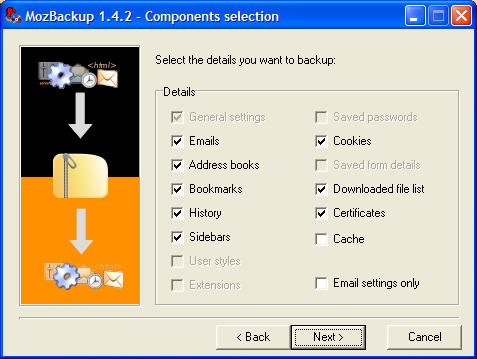
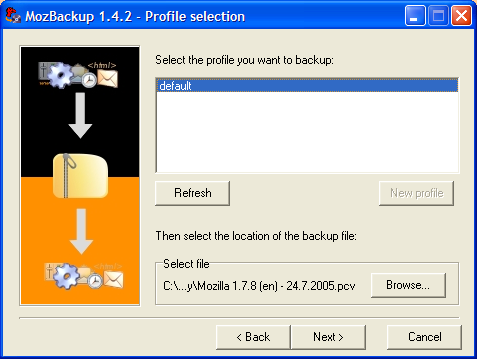
It allows you to backup and restore bookmarks, mail, contacts, history, extensions, passwords, cache etc. It's an easy way to do Firefox backup, Thunderbird backup ...
MozBackup is compatible with:
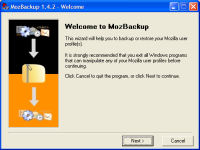
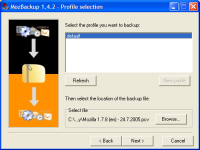
ScreenShots:


Homepage -- http://mozbackup.jasnapaka.com/
Download It Here
Don't Forget To Share It
We All Mozilla Users Suffer From A Basic Problem That When Ever We Install A Window We Lost Our Previous Mozilla Data like bookmarks, mail, contacts, history, extensions, passwords, cache etc.
So Here Is The Solution I am Presenting A Software that will Backup Your All Data Of Browser like bookmarks, mail, contacts, history, extensions, passwords, cache etc.
MozBackup is a simple utility for creating backups of Mozilla Firefox, Mozilla Thunderbird, Mozilla Sunbird, Flock, SeaMonkey, Mozilla Suite, Spicebird, Songbird and Netscape profiles.
It allows you to backup and restore bookmarks, mail, contacts, history, extensions, passwords, cache etc. It's an easy way to do Firefox backup, Thunderbird backup ...
MozBackup is compatible with:
- Firefox 1.0 - 5.0 (newer)
- Thunderbird 1.0 - 5.0 (newer)
- Sunbird 0.3 - 0.9
- Flock 1.0 - 2.6
- Postbox (Express) 1.0 - 1.1
- SeaMonkey 1.0a - 2.3 (newer)
- Mozilla Suite 1.7 - 1.7.x
- Spicebird 0.4 - 0.8
- Songbird 1.0 - 1.7
- Netscape 7.x, 9.x
- Wyzo
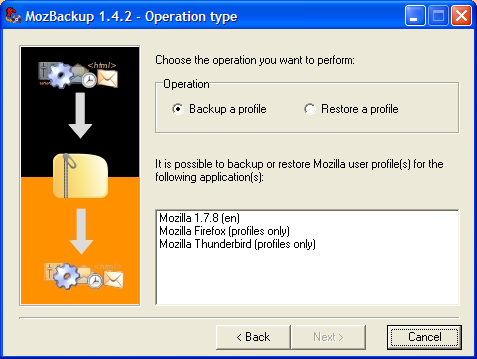
ScreenShots:

Homepage -- http://mozbackup.jasnapaka.com/
Download It Here
Don't Forget To Share It
Tuesday, March 20, 2012 0
Saturday, January 14, 2012

As you may know, Google Chrome 17.0.963.26 Beta
has already been released in the beta stage about a week.As in this
post you can download Chrome 18.0 Beta Version and it includes a great
features, so click given below download link to download Chrome.
For more information about alpha and developer builds, check out the Chrome dev channel here.

Saturday, January 14, 2012 0

User Experience. The enhancements to Firefox provide the best possible browsing experience on the Web. The new Firefox smart location bar, affectionately known as the "Awesome Bar," learns as people use it, adapting to user preferences and offering better fitting matches over time.
Performance. Firefox is built on top of the powerful new Gecko platform, resulting in a safer, easier to use and more personal product.
Security. Firefox raises the bar for security. The new malware and phishing protection helps protect from viruses, worms, trojans and spyware to keep people safe on the Web.
Customization. Everyone uses the Web differently, and Firefox lets users customize their browser with more than 5,000 add-ons.
Friday, January 6, 2012
The Chrome team is excited to announce the release of Chrome 17 to the Beta Channel. 17.0.963.26 contains a number of new features including:
- New Extensions APIs
- Updated Omnibox Prerendering
- Download Scanning Protection
- Many other small changes
For more information about alpha and developer builds, check out the Chrome dev channel here.
Friday, January 6, 2012 0
Monday, December 26, 2011

What’s new in Firefox 11 Aurora?
- Firefox can now migrate your bookmarks, history, and cookies from Google Chrome
- The CSS text-size-adjust property is now supported
- Windows: An OS security dialog should no longer come up when updating
- View source syntax highlighting now uses the HTML5 parser (see bug 482921)
- The outerHTML property is now supported on HTML elements
- The Style Editor for CSS editing is now available to web developers
- Web developers can now visualize a web page in 3D using Tilt
- SPDY protocol support for faster page loads is now testable
- XMLHttpRequest now supports HTML parsing
- Files can now be stored in IndexedDB (see bug 661877)
- Websockets has now been unprefixed
- Redesigned media controls for HTML5 video
- Firefox notifications may not work properly with Growl 1.3 or later (see 691662)
 Check out Firefox 11 Aurora release notes.
Download Firefox 11 Aurora from here.
Or

Monday, December 26, 2011 0
Friday, December 23, 2011

A full-featured Internet browser, Opera includes pop-up blocking, tabbed browsing, integrated searches, and advanced functions like Opera's groundbreaking E-mail program, RSS Newsfeeds and IRC chat. And because we know that our users have different needs, you can customize the look and content of your Opera browser with a few clicks of the mouse.
- Speed Dial: Your favorite sites are just one click away at all times.
- Search Shortcuts: Faster search - type your queries directly into the address bar.
- Trash Can: Instantly reopen recently closed tabs.
- Mouse Gestures: With Opera you can navigate the Web with your mouse.
- Opera Link: Synchronize data of your choice online, or among different computers and devices.
- Quick Find: Opera remembers not only the titles and addresses, but also the actual content of the Web pages you visit.
- Feed Preview: Preview a Feed by clicking on the feed icon, and you will see it in clean and efficient multiple-column layout.
- Quick and customizable Web search: Get quick access to Google, eBay, Amazon and more with the search field in the upper right corner.
Or
Friday, December 23, 2011 0
User Experience. The enhancements to Firefox provide the best possible browsing experience on the Web. The new Firefox smart location bar, affectionately known as the "Awesome Bar," learns as people use it, adapting to user preferences and offering better fitting matches over time.
Performance. Firefox is built on top of the powerful new Gecko platform, resulting in a safer, easier to use and more personal product.
Security. Firefox raises the bar for security. The new malware and phishing protection helps protect from viruses, worms, trojans and spyware to keep people safe on the Web.
Customization. Everyone uses the Web differently, and Firefox lets users customize their browser with more than 5,000 add-ons.
Click Here To Download
Or
Click Here

The latest version of the browser includes support for:
- Accelerators - which allow supported web applications to be invoked without explicitly navigating to them.
- WebSlices - which allows portions of page to be subscribed to and monitored from a redesigned Favorites Bar.
- InPrivate privacy features.
- SmartScreen phishing filter.
Subscribe to:
Posts (Atom)